
You have skills, ideas, and experience.
The Lunch Box Products Tool is where all of that becomes something people can actually buy.
Inside Lunch Box for Skoolers, the Products Tool is the backbone of your monetization system. It is where you define what you sell, how much it costs, and how it connects to your offers, leads, proof, and AI-generated posts.
In this guide, you’ll learn:
- What the Lunch Box Products Tool is
- Who it’s for (hint: not only Skool community owners)
- How products connect to the rest of your Lunch Box
- How becoming a vendor on SkooledUp works (and how the 5% fee fits in)
- A simple step-by-step workflow to set up your first product
By the end, you’ll see why products are the core of your Lunch Box—and why everything else plugs into them.
What Is the Lunch Box Products Tool?
The Lunch Box Products Tool is your product control center.
It sits on top of WooCommerce and lets you manage all the things you sell in one simple view.
A “product” can be:
- A live coaching call or package
- A cohort or ongoing program
- A self-paced digital course
- A template pack or swipe file
- A membership or subscription
- A one-off service or done-for-you offer
- A bundle that combines everything above
Instead of keeping this information in random notes, you create a product card with:
- Product name
- Price and billing type (one-time or recurring via WooCommerce)
- What’s included and who it is for
- The checkout URL so people can pay you
- Any key details you want to remember later
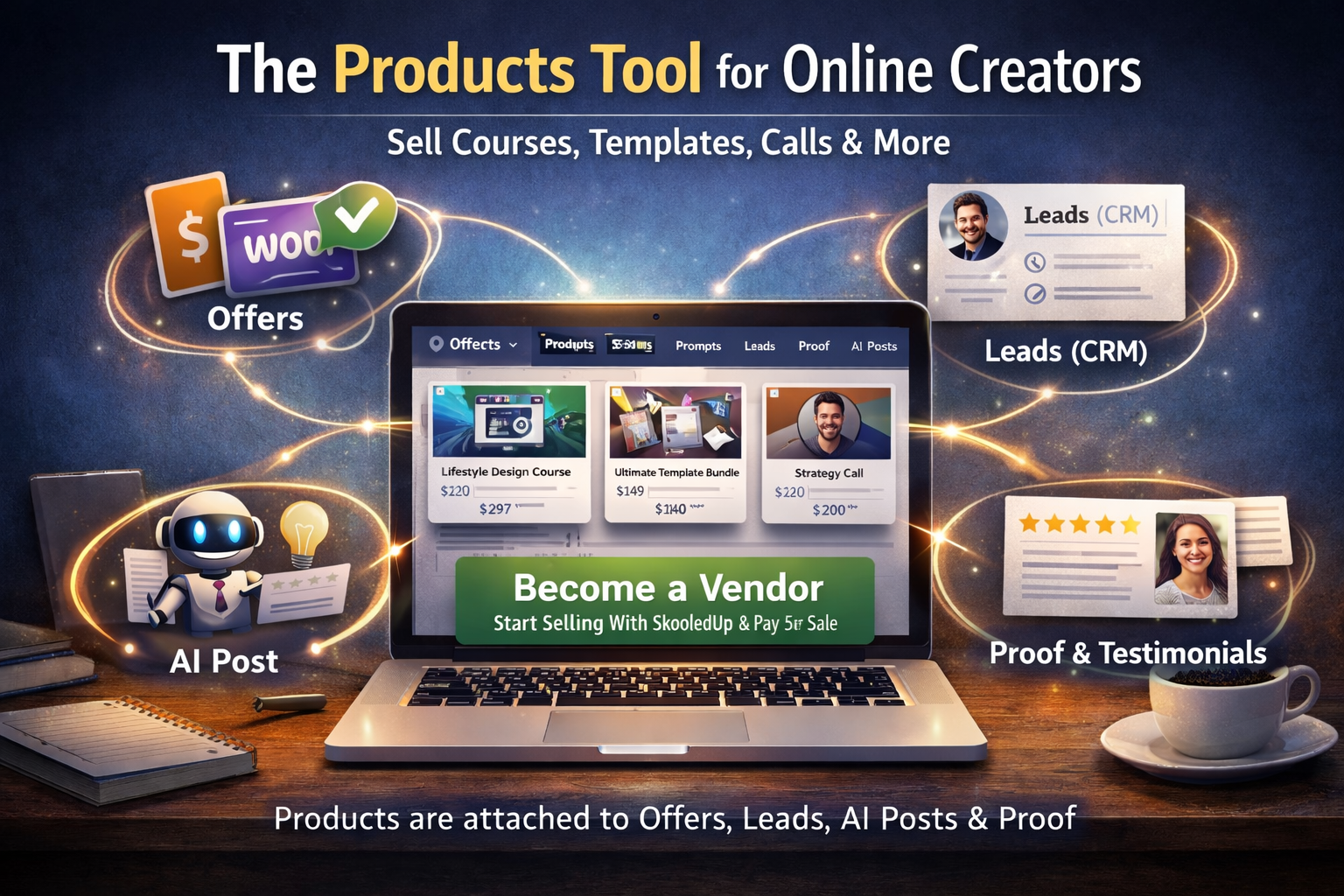
From there, the Products Tool makes it easy to attach each product to Offers, AI Posts, Leads, and Proof so everything stays in sync.
Who Is the Products Tool For?
The Lunch Box Products Tool is designed for Skool creators, but it works for anyone who sells online.
It’s a great fit if you are:
- A Skool community owner who wants one place to manage all your programs, upsells, and downsells
- A coach or consultant who sells calls, packages, and retainers
- A course creator running launches or evergreen funnels
- A service provider or agency owner offering done-for-you work
- A digital product seller with templates, Notion systems, worksheets, or swipe files
- A membership or subscription creator who charges monthly or yearly
You might use Skool, Circle, Discord, Kajabi, WordPress, or something else.
Lunch Box doesn’t replace your main platform. Instead, it gives you a neutral hub where all of your monetization lives so you can plug it into any platform and channel.
Become a Vendor on SkooledUp (5% per Sale)
There are two ways to use the Products Tool:
- Use your own WooCommerce store on your site
- Become a vendor on SkooledUp and sell through our marketplace
If you don’t want to set up your own store or deal with checkout flows, you can click “Become a Vendor” and sell directly from SkooledUp.
Here’s what that means:
- We host your product pages and checkout
- Customers buy through SkooledUp
- You receive payouts for your sales
- We keep a simple 5% fee per sale
You get a clean way to start selling without needing to build all the tech yourself. Your products still show up inside your Lunch Box dashboard, and you can still attach them to your offers, leads, proof, and AI posts like any other product.
If you already have WooCommerce set up on your own domain, you can keep using that and still track everything from the Products Tool. If you don’t, becoming a vendor is the fastest way to go live.
How Products Connect to the Rest of Your Lunch Box
The Lunch Box Products Tool doesn’t live in isolation. It connects to everything else so you never lose track of what you sell, who wants it, and how you talk about it.
Let’s break down those connections.
1. Products + Offers: “What They Buy” vs “How You Present It”
- Products are what people actually get when they pay: the course, call, template, or membership.
- Offers are how you present that product to different audiences, price points, or campaigns.
For example:
- Product: “12-Week Fitness Transformation Program”
- Offers:
- “New Year Reset – 12 Weeks to a Stronger You”
- “VIP 1:1 Coaching + 12-Week Transformation”
- “Founders Discount – First 20 Spots”
In your Lunch Box:
- You create the product once in the Products Tool
- You create multiple offers that all point to that same product
- Each offer includes different copy, angles, bonuses, and pricing if needed
The result: you can test new angles and campaigns without rebuilding the product each time.
2. Products + AI Post Generator: Fast, On-Brand Content
When you use the AI Posts tab, you can:
- Pick an offer
- Attach one or more products
- Pull in proof and prompts
- Tell the AI which channel you’re writing for (Skool post, DM, email, etc.)
Because your products already live in the Products Tool, the AI Post Generator can:
- Insert accurate product names, benefits, and pricing
- Keep your messaging consistent across channels
- Help you generate posts, emails, and DMs that match the exact thing you sell
No more retyping your product details every time you write content.
The Lunch Box Products Tool acts like a single source of truth for all your offers and marketing.
3. Products + Leads (CRM): Know Who Wants What
Your Leads / CRM tab stores people who have raised their hand:
- They commented on a Skool post
- They replied to a DM
- They filled out a form
- They clicked a link or showed some kind of interest
From the CRM side, you can:
- Attach a product to a contact (or multiple products)
- Track which offer they saw or responded to
- Log their stage (cold, warm, hot, buyer, former client)
- Record the next action you want to take
Because your products live in one place, you can quickly answer:
- “Who’s interested in this specific product?”
- “Which product should I follow up with this lead about?”
- “What are my warmest leads for this new course launch?”
Products turn your CRM notes into actionable sales pipelines instead of random comments and threads.
4. Products + Proof: Show the Results for Each Product
The Proof tab is where you store:
- Testimonials
- Screenshots
- Wins from your community
- Case studies and stories
You can attach proof entries to specific products and offers.
That way, when you:
- Launch a course
- Promote a coaching program
- Re-open a membership
…you can instantly filter for the proof that matches that product.
Then, inside the AI Posts tab, you can pull that proof into your Skool posts, emails, and DMs with a click. No more digging through old screenshots or buried threads.
Step-by-Step: Setting Up Your First Product
Here’s a simple workflow to get your first product live inside the Lunch Box Products Tool.
Step 1: Decide What You’re Selling
Start with one clear product:
- A 60-minute strategy call
- A four-week group sprint
- A signature course
- A template bundle
- A membership to your community
Write down:
- The name of the product
- Who it is for
- What problem it solves
- What outcome it promises
Step 2: Create the Product Card
Inside the Lunch Box Products Tool:
- Click Add Product
- Enter the product name and short description
- Set the price (and billing if it’s recurring)
- Add the WooCommerce product link or connect it to your SkooledUp vendor product
- Note any key details you want to remember (bonus calls, start dates, etc.)
You now have a reusable product that sits at the center of your Lunch Box.
Step 3: Connect It to an Offer
Next, switch to the Offers tab:
- Click Add Offer
- Choose a hook or angle (for example: “30-Day Content Sprint for Busy Creators”)
- Attach your product from the dropdown
- Write offer copy: who it’s for, what’s included, what result they get
- Add the checkout link (your WooCommerce checkout or SkooledUp vendor link)
Each time you create a new offer, you reuse the same product instead of starting over.
Step 4: Attach Proof and Leads
- Go to the Proof tab and add success stories, screenshots, and testimonials linked to that product.
- Go to the Leads tab and tag contacts who showed interest in this product or offer.
This makes it easy to build targeted follow-ups and launch content later.
Step 5: Generate Posts with the AI Post Tool
Finally, open the AI Posts tab:
- Select your offer and attached product
- Pick a saved prompt or write a new one
- Choose where the content will go (Skool, email, DM, social post, etc.)
- Let the AI generate your post draft
- Edit it in your own voice and hit publish or send
Because everything is connected, your posts stay accurate and focused on the right product, proof, and audience.
Why the Products Tool Matters Long-Term
Most creators start with scattered systems:
- A Google Doc with product ideas
- A Stripe link they can’t remember
- A random checkout page buried in their site
- A note on their phone with a half-finished offer
The Lunch Box Products Tool pulls all of that into one structured place.
Long-term, this gives you:
- Clarity – you can see everything you actually sell at a glance
- Speed – it’s easy to grab the right product + offer when you’re on a call or in DMs
- Consistency – your messaging matches across posts, emails, and sales pages
- Better data – you can link products to proof and leads so you know what works
When you combine that with the option to become a vendor on SkooledUp and pay just 5% per sale, you get a clean, simple way to start selling without building a full tech stack.
Final Thoughts
The Lunch Box Products Tool is the hub that connects everything you do to earn money online:
- Products define what you sell
- Offers frame those products for different audiences
- AI Posts help you talk about them
- Leads show who wants them
- Proof shows that they work
Whether you run a Skool community, coach clients 1:1, sell templates, or run a full education business, the Lunch Box Products Tool gives you a clear, connected foundation to grow from.
Set up one product today, connect it to an offer, and use the AI Posts tab to write and publish your next piece of content. Once you feel that flow, your whole monetization system starts to click into place.