

If you sell coloring books, printables, art, or any kind of digital download, you know the risk that comes with showing high-quality previews. One screenshot or right-click, and someone can walk away with what should have been a paid product.
That’s exactly why we built Watermark By Category for WooCommerce – a simple, affordable plugin that lets you protect your WooCommerce product gallery by category, without making your store harder to manage.
You can grab it here:
👉 Watermark By Category for WooCommerce – Protect Your Product Images for $5


What Is Watermark By Category for WooCommerce?
Watermark By Category for WooCommerce is a lightweight WordPress plugin that adds watermarks to your WooCommerce product images based on the product category they belong to.
Instead of applying one global watermark to everything, you can:
- Use a strong watermark for coloring books and digital pages
- Use a more subtle watermark for photo previews or mockups
- Leave other categories watermark-free if you want
This gives you control without complexity. You choose which categories need protection and what each watermark looks like.
Simple ZIP Upload – No Coding Required
The plugin is packaged as a standard ZIP file so installation is as simple as any other plugin:
- Log in to your WordPress dashboard.
- Go to Plugins → Add New.
- Click Upload Plugin.
- Select the ZIP file and click Install Now.
- Activate the plugin.
That’s it. No extra setup wizard, no complicated steps. Once activated, you’ll see a Watermark option in your admin menu, and from there you control everything.
How It Works Inside WooCommerce
After activation, Watermark By Category for WooCommerce integrates smoothly with your existing WooCommerce categories and product galleries.
You’ll be able to:
- Choose a watermark image for each WooCommerce category
- Upload different watermark files based on the type of product
- Save your settings and let the plugin automatically overlay those watermarks on your gallery images
Real Example: Coloring Book Watermarks
One of the best use cases is coloring book previews.
In the blog post, you’ll be adding:
- A screenshot showing how a coloring book product looks in the WooCommerce gallery with the watermark applied.
This makes it very clear to visitors:
- They can still see the design and style of the pages
- But they cannot download a clean version without paying
- The watermark protects your art while still letting the product sell itself
A Quick Tour of the Plugin Screens
To help you (and your readers) understand how simple it is, here’s how the three main views line up with the screenshots you’ll include.
1. The Watermarked Gallery View
Your first screenshot will show a WooCommerce product gallery where the watermark is applied across the coloring book images.
This view shows the front-end result:
- Watermarks appear consistently on the product gallery
- The previews look professional, but clearly protected
- Customers get a good idea of what they’re buying without getting a free copy
2. The Admin Dashboard Menu
Your second screenshot will show the WordPress admin left menu, where there’s a clear Watermark menu item.
This demonstrates that the plugin:
- Integrates like a normal WordPress plugin
- Is easy to find and manage
- Doesn’t clutter your dashboard with unnecessary panels
You don’t need to dig through WooCommerce settings to find it. It has its own logical place in the admin.
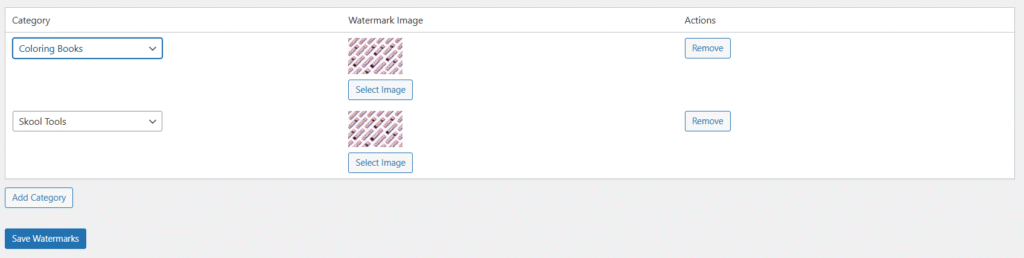
3. The Watermark Backend Screen (Per Category Control)
The third screenshot will show the backend settings page where you can:
- Select a WooCommerce product category
- Upload or choose a watermark image from your media library
- Assign different watermarks to different categories
This per-category control is the core feature of Watermark By Category for WooCommerce. It lets you customize protection for each type of product while keeping everything centralized and easy to manage.
Three Sample Watermarks Included
To get you started even faster, the plugin comes with three sample watermarks.
You can:
- Use them immediately for quick protection
- Customize them later as your branding evolves
- Use them as inspiration to design your own branded watermark sets
This means you don’t have to pause your workflow to run off to a design tool before you can start protecting your images.
Price: $5 + 250 AI Tokens
We wanted this to be an easy “yes” for any store owner, whether you’re just starting out or already running a large WooCommerce shop.
That’s why Watermark By Category for WooCommerce costs only $5.
On top of that, purchasing the plugin also gives you 250 AI tokens, which you can use inside the Skooledup ecosystem for AI tools and automations (like content, images, and more).
So with a single small purchase, you get:
- A plugin that protects your WooCommerce product gallery
- Per-category watermark control
- Three ready-to-use sample watermarks
- And 250 AI tokens as a bonus
You can get it here:
👉 Watermark By Category for WooCommerce – Protect Your Product Images for $5
Why Watermark Product Images at All?
Some people ask, “If someone wants to steal, they’ll steal anyway. Why bother?”
Here’s why watermarking still matters:
- It stops casual theft. Most people won’t go through the effort to remove a watermark.
- It protects digital downloads. Coloring pages, worksheets, and art prints are easy targets without watermarks.
- It keeps your previews safe. Customers can see what they’re buying without getting a printable version for free.
- It reinforces your brand. A well-designed watermark can carry your logo or site name and subtly market your brand.
When combined with smart previews and low-resolution images, watermarking is a practical line of defense for any WooCommerce store that depends on visual products.
Who Should Use Watermark By Category for WooCommerce?
This plugin is especially useful for:
- Coloring book creators (adult and kids’ books)
- Printable sellers (planners, worksheets, checklists, journals)
- Photographers and artists selling digital files or prints
- Course creators who include visual PDFs or download packs
- Template and design shops running their store on WooCommerce
If you have at least one product category where image theft is a concern, Watermark By Category for WooCommerce gives you a simple, targeted solution without weighing down your site.
Final Thoughts
If you’re serious about selling digital products, protecting your visuals is part of doing business. You don’t need a complicated security suite to start. Sometimes a focused, well-designed tool is exactly what you need.
Watermark By Category for WooCommerce was built to be:
- Simple to install
- Easy to manage
- Smart enough to handle different categories differently
- Affordable for any store owner
For just $5, plus 250 AI tokens, you can start protecting your product images today.
👉 Get the plugin here:
Watermark By Category for WooCommerce – Protect Your Product Images for $5
If you want, next I can turn this into a separate product description version (shorter, more sales-focused) or give you a Yoast-optimized SEO title and meta description specifically for the blog post.