
Most creators don’t need a giant corporate CRM.
They just need a clean list of people who raised their hand.
That’s exactly what the Lunch Box Leads Tool gives you.
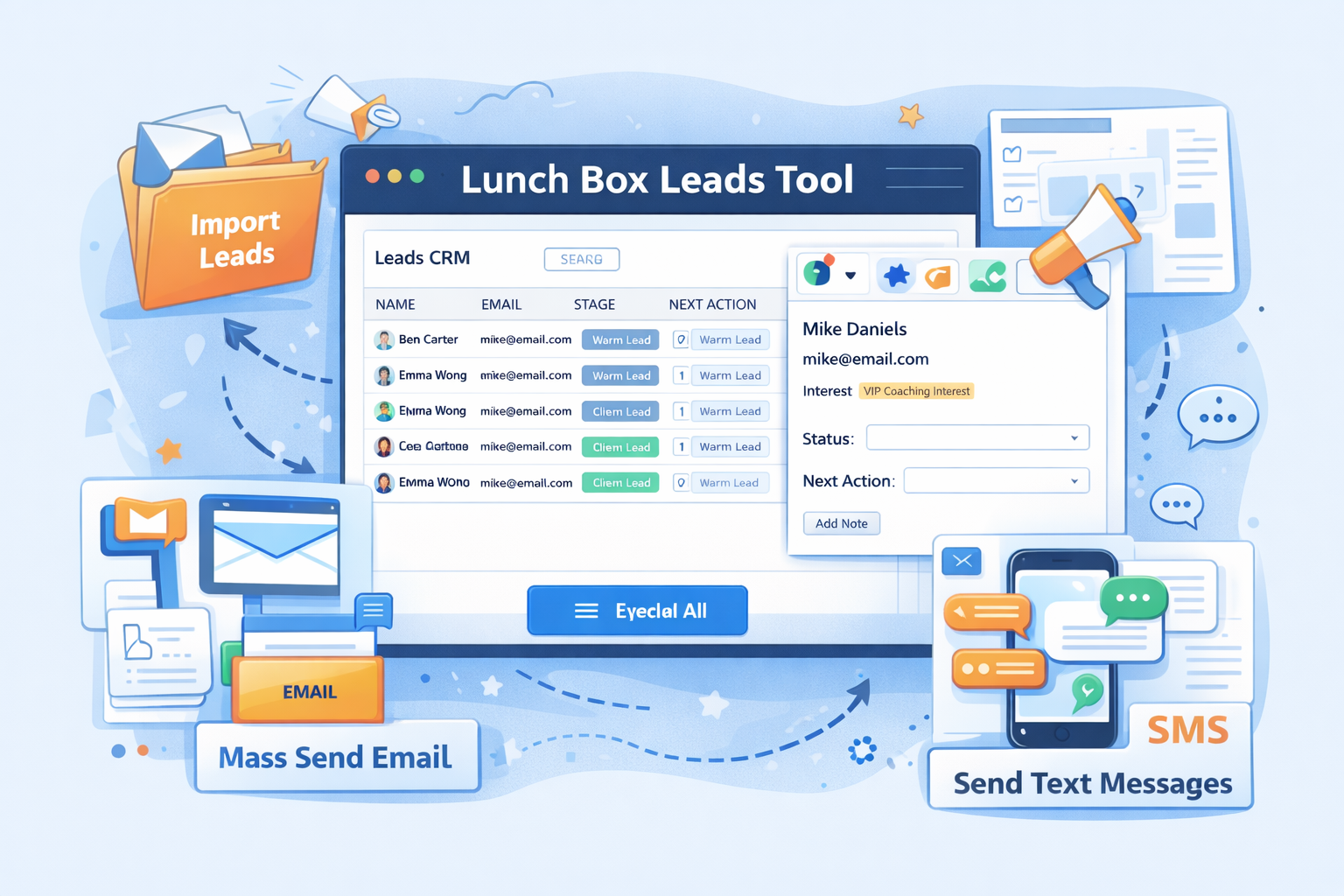
It’s a lightweight CRM built into your Lunch Box dashboard. You can store leads, track where they came from, log what they want, and send focused email or SMS broadcasts when you’re ready to make an offer. It works beautifully with Skool communities, but it also works for coaches, freelancers, course creators, agencies, and SaaS founders who never touch Skool at all.
In this guide, you’ll learn:
- What the Lunch Box Leads Tool is
- How importing and organizing leads works
- How mass email and SMS sending fits in
- How Leads connects to Offers, Products, Prompts, Proof, and AI Posts
- Practical workflows for different types of businesses
- Best practices for turning leads into paying clients
What Is the Lunch Box Leads Tool?
The Lunch Box Leads Tool is a built-in CRM (customer relationship manager) for your Lunch Box account. Instead of juggling spreadsheets, sticky notes, and random DMs, you get one simple place to:
- Store lead contact details
- Track interest and stage (cold, warm, hot, client, etc.)
- Record the next action you should take
- Trigger mass email and SMS campaigns to targeted segments
It’s designed for busy creators and business owners who don’t want to spend hours configuring a complicated CRM. You get the essentials you actually use, plus deep connections to the rest of the Lunch Box system.
Why Creators Need a Leads Tool
Whether you run a Skool community, sell digital products, or work 1:1 with clients, your business lives and dies by one simple thing:
Are you following up with the right people, at the right time, with the right offer?
Without a leads tool, three problems show up fast:
- You forget people.
Someone comments that they’re interested, you tell yourself you’ll DM them later, and then twenty notifications bury the conversation. - You send random blasts.
Because you don’t know who is interested in what, every email or post feels generic and weak. - You lose warm opportunities.
People are excited for a few days, but you don’t have a system to keep the conversation going.
The Lunch Box Leads Tool fixes this by turning every “maybe” into a visible record with a clear next step.
Key Features of the Lunch Box Leads Tool
1. Centralized Lead List
At the heart of the Lunch Box Leads Tool is your lead list. Each entry can include:
- Name
- Email address
- Phone number (for SMS)
- Source (Skool post, DM, webinar, referral, ad, etc.)
- Interest (which offer, product, or topic they care about)
- Stage (new lead, warm lead, hot lead, client, past client)
- Notes and context
- Next action and due dates
Because everything lives in one place, you can open your Lunch Box and instantly see who to follow up with today.
2. Import Leads in Bulk
If you already have leads sitting in:
- Spreadsheets
- Email lists
- Other CRMs
- Downloaded CSV files from your payment processor or course platform
…you don’t have to start from scratch.
The import feature in the Lunch Box Leads Tool lets you bring all those contacts into your Lunch Box CRM. Once they’re imported, you can:
- Tag them by source or interest
- Align them with your current Offers and Products
- Prepare them for segmented email or SMS campaigns
This turns scattered data into an organized, actionable pipeline.
3. Manual Lead Capture for Daily Conversations
Not every lead comes from a CSV file. Many come from simple conversations:
- A Skool comment
- A DM on Instagram or X
- A quick chat at a live event
- A reply to your newsletter
When that happens, you can add them straight into the Lunch Box Leads Tool:
- Open your Lunch Box dashboard.
- Create a new lead.
- Add their name, contact info, and a quick note about the conversation.
- Set the next action (DM them tomorrow, send a link, invite them to a call, etc.).
Now that person is no longer a forgotten DM. They’re part of your follow-up system.
4. Lead Stages and Next Actions
The Lunch Box Leads Tool makes it easy to see where each contact is in their journey:
- New lead – just joined your world
- Warm lead – consumed content, clicked links, attended a call
- Hot lead – directly asked about working with you
- Client – already purchased something
- Past client – great for upsells and reactivation campaigns
For each lead, you can log the next action you want to take:
- Send a short DM with a question
- Invite them to a free training
- Offer a specific product
- Book a sales call
- Follow up after a proposal
Instead of wondering “Who do I talk to today?”, you open the Lunch Box Leads Tool and simply follow the next actions.
How Leads Connects to Offers, Products, Prompts, and Proof
The real power of the Lunch Box Leads Tool comes from how it connects to the rest of the Lunch Box ecosystem.
Leads + Offers
Your Offers tab defines your different ways to work with people:
- 1:1 coaching packages
- Group programs
- Courses or memberships
- Done-for-you services
- VIP days, audits, or intensives
When you look at a lead, you can tie their interest directly to a specific offer. That way you always know which outcome to talk about and which checkout link to send.
Leads + Products
Your Products are the WooCommerce items connected to your offers:
- Digital products
- Bundles
- Payment plans
- Upsells and downsells
Because Lunch Box already knows your products, it’s easy to move a lead from “interested” to “buyer” by sending them a clear product link or automation.
Leads + Prompts
The Prompts tool stores your best AI prompts for:
- DMs
- Skool posts
- Follow-up sequences
- Sales emails
When you’re working inside the Lunch Box Leads Tool, you can pull from your saved prompts to quickly generate:
- Personalized outreach messages
- Follow-up emails
- Re-engagement campaigns
This means you don’t rewrite the same messages again and again. You reuse what already works.
Leads + Proof
The Proof tab holds testimonials, screenshots, and case studies. When you reach out to a warm lead, you can:
- Grab a relevant piece of proof
- Paste it into a DM or email
- Show results that match the lead’s situation
Now your follow-up isn’t just “trust me.” It’s backed by real evidence.
Leads + AI Posts
Finally, your AI Posts feature lets you turn offers, products, proof, and prompts into published content. You can:
- Generate Skool posts designed to attract more of your ideal leads
- Use your leads list to see what questions are common
- Turn those questions into content that drives more people into your CRM
The Lunch Box Leads Tool doesn’t stand alone. It’s the central hub that uses data from every other part of Lunch Box to make your follow-up sharper.
Mass Email and SMS: Turning Leads into Buyers at Scale
Collecting leads is only half the game. You also need a way to reach many people at once.
That’s where mass email and SMS come in.
From your Lunch Box Leads Tool, you can:
- Select a segment of leads (for example, “warm leads interested in group coaching”).
- Craft an email or text campaign that points to a specific offer or product.
- Send it to everyone in that segment in one move.
Email works well for longer messages, launches, and nurturing.
SMS is perfect for:
- Time-sensitive reminders (“We’re live in 15 minutes”)
- Short nudges (“Last chance to grab the discount”)
- Quick touchpoints (“How did the last call land for you?”)
Because both email and SMS come from the same lead list, you keep everything synced. You know who you contacted, when, and why.
Who the Lunch Box Leads Tool Is For (Beyond Skoolers)
The Lunch Box Leads Tool fits Skool communities perfectly, but it’s not limited to them. It’s useful for anyone who talks to humans and sells something online.
Here are a few examples.
1. Skool Community Owners
If you run a Skool community, every:
- Comment
- Post reply
- DM
- Zoom call
…can produce leads. With the Lunch Box Leads Tool you can:
- Log who asked about coaching
- Tag people who responded to a poll
- Track which members show buying signals
- Send email or SMS campaigns to follow up with interested groups
Instead of letting warm members disappear, you turn community noise into a structured pipeline.
2. Coaches and Consultants
If you coach people 1:1 or in groups, you likely:
- Offer free strategy calls
- Answer questions in DMs
- Speak in other people’s communities
- Run webinars or live trainings
The Lunch Box Leads Tool lets you capture every single person who raises their hand and nurture them until they’re ready to work with you.
3. Creators and Course Sellers
For creators who sell digital products, courses, or templates:
- Every download, free resource, or challenge sign-up is a lead.
- Every high-engagement follower is a lead.
You can import those contacts, segment them by interest, and then send targeted promotions for your most relevant products.
4. Agencies and Service Providers
Agencies and done-for-you service providers deal with:
- Inbound inquiries from their site
- Referrals from past clients
- Leads from cold outreach or ads
The Lunch Box Leads Tool gives you one place to track the pipeline from “cold inquiry” all the way to “signed client” and beyond.
Simple Workflow: From Skool Comment to Paid Client
Here’s a practical example of how the Lunch Box Leads Tool might fit into your day.
- Someone comments on your Skool post:
“I’ve been thinking about hiring a coach for this. How does it work?” - You add them as a lead:
- Name and email
- Source: Skool comment
- Interest: 1:1 coaching offer
- Stage: warm lead
- Next action: send DM invite to a call
- You follow up with a DM:
Use a saved prompt to craft a short, friendly message that invites them to a 15-minute fit call. - They book a call and become a client:
You update their stage to client, and you link them to the correct product or subscription. - You add proof later:
When they get results, you capture a testimonial and store it in Proof. Now that proof can help you close similar leads in the future.
The whole flow stays visible inside the Lunch Box Leads Tool.
Best Practices for Using the Lunch Box Leads Tool
To get the most out of your Lunch Box CRM, keep these habits:
- Log leads daily.
If someone shows interest, add them within 24 hours. Don’t trust your memory. - Always set a next action.
A lead without a next action is a lead that will go cold. - Segment by interest, not just stage.
Knowing who wants group coaching vs. self-paced courses makes your campaigns sharper. - Use prompts to speed up follow-up.
Save your best DMs and emails as prompts so you can reuse winning messages. - Feed proof back into the system.
When a client wins, store that story. Your future sales will be easier. - Respect inboxes.
Email and SMS are powerful. Use them to send helpful, relevant messages, not spammy blasts.
Turning Interest into Income with the Lunch Box Leads Tool
Leads are the raw material of your business.
The Lunch Box Leads Tool turns that raw material into something useful:
- A clear, organized list of people to help
- A simple view of who is ready now and who needs nurturing
- A direct path from daily conversations to real revenue
- A bridge between your Leads, Offers, Products, Prompts, Proof, and AI Posts
Whether you’re a Skool community owner, a coach, a course creator, or a service provider, the Lunch Box Leads Tool gives you a practical way to track interest, follow up consistently, and make more sales without feeling scattered.
Use it every day, update it as you go, and watch how much easier it becomes to turn “I’m interested” into “I’m in.”